• 0 Shopping Cart
  • Account
    • Login
    • Forgot Password?
  • Home
  • Store
    • Browse All
    • Managed Business Hosting
    • Managed WordPress Hosting
    • Shared Hosting
    • SSL Certificates
    • E-mail Services
    • Website Security
    • Website Builder
    • VPN
    • Professional Email
    • Register a New Domain
    • Transfer Domains to Us
  • Announcements
  • Knowledgebase
  • Network Status
  • Contact Us
  • More

Knowledgebase

  1. Portal Home
  2. Knowledgebase
  3. SolusVM
  4. SolusVM VPS Management
  5. How to Change the Network Card to Virtio, Intel PRO, or Realtek in SolusVM

  Categories

Backup/Restore
4
Cloudflare (cPanel)
9
CloudLinux (cPanel)
10
cPanel - Control Panel
24
Databases
11
DirectAdmin
48
DNS - Nameservers
6
Domain Management
10
Email
17
FTP
9
Installing a Control Panel
6
Mail Filters & SPAM
8
Mobile
11
Others
3
PayPal
7
Plesk
47
Security
10
SiteWorx (Control Panel)
58
Softaculous
69
SolusVM
18
SSL
5
Virtualizor
19
WHM
18
WordPress
17

  Categories

  Support

My Support Tickets
Announcements
Knowledgebase
Downloads
Network Status
Open Ticket

How to Change the Network Card to Virtio, Intel PRO, or Realtek in SolusVM Print

  • 0

You can change your network card from the SolusVM control panel.


1. Log in to your SolusVM Control Panel.

2. If you have multiple VPSs, select the appropriate one.
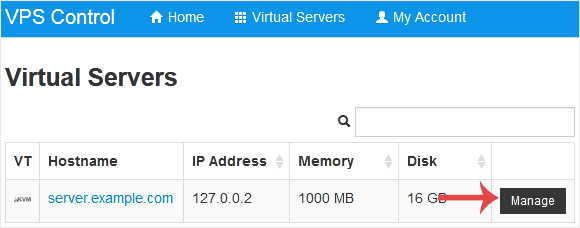
solusvm-select-vps.gif


3. Scroll down. Under the Settings tab, you can find the Network Card option. Select the appropriate network card from the drop-down menu.
solusvm-network-card-change.gif


4. Reboot your VPS so that the changes can take effect.


Was this answer helpful?

Related Articles

How to Reboot/Restart VPS in SolusVM You can restart VPS via the command line or SolusVM.How to Reboot/Restart a VPS via SolusVM?1.... How to Reinstall OS Using SolusVM OS-Reinstaller You can easily Install/Reinstall the operating system using SolusVM. However, note that this... How to Turn APIC, ACPI, VNC, or PAE On or Off in SolusVM SolusVM allows you to enable or disable VNC, PAE, APIC, and ACPI.1. Log in to your SolusVM... How to Change the Disk Driver to Virtio or IDE in SolusVM We recommend changing the disk driver to Virtio or IDE before installing the operating system.... How to Manually Install/Reinstall an OS using SolusVM for a Customized Installation SolusVM's automatic reinstall option does not allow you to modify or create a custom partition....
« Back

Powered by WHMCompleteSolution

  Support

My Support Tickets
Announcements
Knowledgebase
Downloads
Network Status
Open Ticket

Build Your Website with MAN IT

From professional business to enterprise, we’ve got you covered!

Contact Us

MAN IT Cloud – Cloud Hosting, Simplified for Business.

Navigation

  • Home
  • About
  • Contact
  • F.A.Q

Useful Links

  • Domain
  • Business Hosting
  • Wordpress Hosting
  • Shared Hosting

Contact Us

  • +8801620343215
  • support@manitcloud.com
  • MAN IT, Nirala R/A, Palong, Shariatpur-8000,Bangladesh

  • Contact Us

Copyright © 2026 MAN IT Cloud. All Rights Reserved.


Loading...
Loading...

Choose Currency

$ USD
৳ BDT

Generate Password

Please enter a number between 8 and 64 for the password length